
Transform Your Academic & Career Journey Anywhere with Intern Stump
AI-driven learning, live classes, real-time assignment tracking, 24/7 Insyrio AI SME support and verified 8C certificates - all in one place. The Android & iOS apps are coming soon; until then everything works right in your phone's browser.
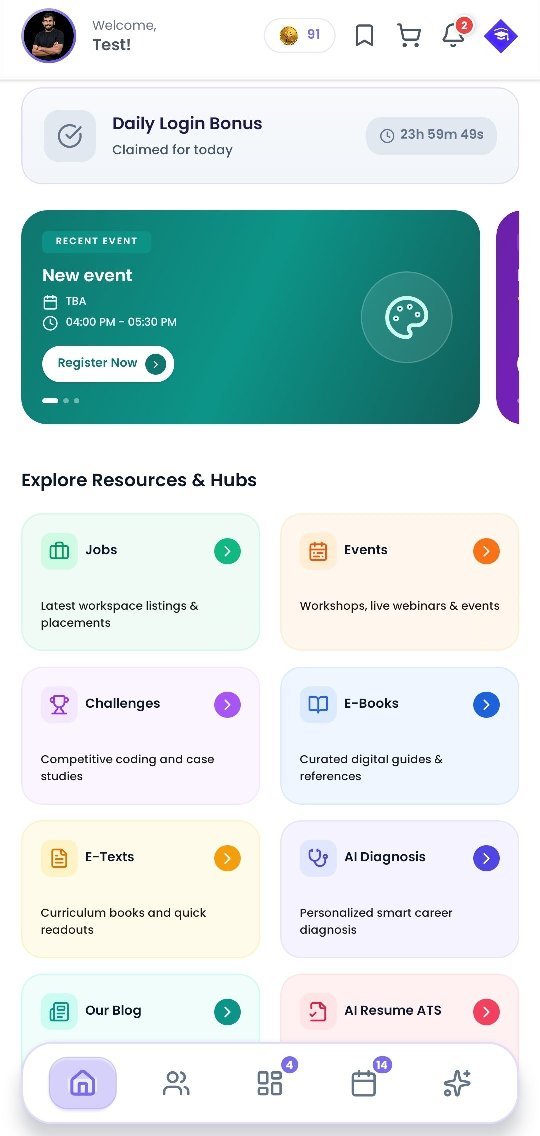
Comprehensive Mobile Learning & Career Suite
Explore the features designed for seamless learning, proof-of-work tracking, and career readiness.
Feature Suite Overview
Live & Recording Classes
Attend interactive live sessions or catch up anytime with HD recorded lectures.
Assignments
Submit practical assignments, get mentor feedback, and track submission history.
Attendance
Real-time attendance logging, session streaks, and compliance tracking.
Course Resource Files
Download source codes, datasets, project templates, and reference guides.
Free Study Material
Access curated learning notes, cheat sheets, and industry interview guides.
Free E-Books
Read domain e-books, research publications, and skill development handbooks.

iSure Coins
REWARDSEarn reward coins for course milestones, streak completions, and redeem for benefits.
Insyrio AI (SME AI)
24/7 AISubject Matter Expert AI assistant to solve queries, explain concepts, and guide projects.
AI Resume ATS
ATS SMARTScan and optimize your resume for Applicant Tracking Systems with AI suggestions.
AI Diagnosis
Evaluate skill gaps and receive personalized career and learning recommendations.
Jobs
Explore verified internship and full-time hiring opportunities directly in-app.
Events
Register for workshops, masterclasses, webinars, hackathons, and tech summits.
Challenges
Participate in coding battles, case studies and design sprints, and win leaderboard badges.
Mentorships
Book 1-on-1 guidance sessions with industry veterans and domain experts.
Intern Stump Blog
Read articles on tech trends, career roadmaps, interview tips, and tech news.
8C & Certificates
View 8C Appraisal Reports and download verifiable course completion certificates.
Instant in-App Alerts
Get real-time notifications for class schedules, job posts, and assignment deadlines.
Contact Support
Reach the student support desk directly via WhatsApp, email, or in-app tickets.
Add Intern Stump to your home screen
The website is built for phones. Add it to your home screen and it opens like an app - with the same account you will use in the Android & iOS apps.
Sign inAndroid (Chrome)
- 1Open the Intern Stump website in Chrome.
- 2Tap the ⋮ menu at the top right.
- 3Choose "Add to Home screen" (or "Install app") and confirm.
iPhone / iPad (Safari)
- 1Open the Intern Stump website in Safari.
- 2Tap the Share button at the bottom.
- 3Choose "Add to Home Screen" and tap Add.